Data Organiser
The data organiser (DO) is the backbone of the pipeline. It is required to sort and prepare data within a workspace, predict which products will be produced during data reduction, write out all of the set-of-files (SOF) files required by each of the soxspipe recipes and keep track of all data-products generated during the reduction cascade. The DO also provides functionality to rewrite SOF files on the fly if a recipe fails to produce a product required by a future recipe (e.g. a master flat frame), switching out the failed product for the next-best product (e.g. the next master flat frame generated closest in time to the recipe data). Finally, on subsequent executions of the pipeline, the organiser prevents data from being re-reduced if the products already exist (unless the user chooses to override this feature).
The algorithm the DO uses to prepare a workspace is shown in Fig. 33.
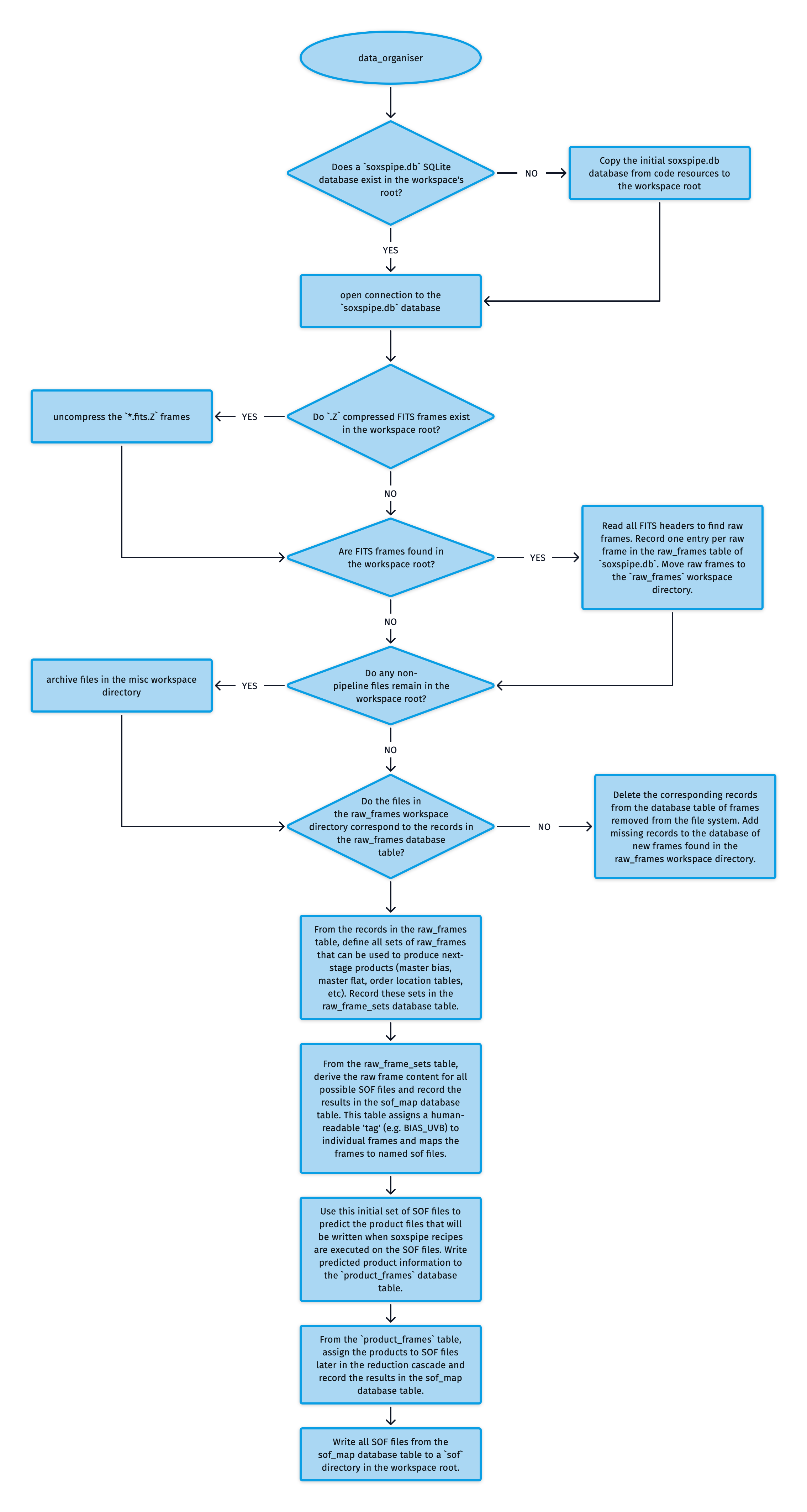
Fig. 33 The algorithm used by the soxspipe data-organiser to prepare a workspace for data reduction.
At the heart of the DO is a SQLite database called soxspipe.db. Here, the organiser’s bookkeeping is performed, recorded, and maintained.
The ESO Science Archive Facility delivers FITS data in a .Z compressed format. When running soxspipe prep, the DO first finds and uncompresses any .Z compressed FITS frames within the workspace root. The DO then reads the FITS headers of all of the FITS frames in the workspace root and selects out the raw (unreduced) frames, recording one entry per raw frame in the raw_frames table of soxspipe.db. The DO then moves these raw frames to a raw directory within the workspace. Any remaining files are moved out of the workspace root and into a misc directory.
A sanity check is performed to ensure that the data in the raw_frames database table matches the data in the raw directory. If frames have been removed from the file system, the corresponding records in the database table are deleted. Also, frames within the raw directory missing from the database table are added.
The next step is for the DO to define all sets of raw frames that can be used to produce next-stage products (master bias, master flat, order location tables, etc). The rules for these associations are read from the soxs_sof_map.yaml file is shipped with the pipeline code. These sets are recorded sets in the raw_frame_sets database table. These raw frame sets derive the raw frame content for all possible SOF files, which are recorded in the sof_map database table, assigning a human-readable ‘tag’ (e.g. BIAS_UVB) to individual frames and mapping the frames to named sof files.
The initial set of SOF files in the sof_map table is used to predict the product files written when soxspipe recipes are executed on the SOF files. The expected product information is written to a product_frames database table. From this product_frames table, products are assigned to SOF files later in the reduction cascade (recorded again in the sof_map table).
Finally, all SOF files from the sof_map table are written to a sof directory in the workspace root and are ready to be used by the various soxspipe recipes during a data-reduction session.
During the running of each pipeline recipe, Quality Control (QC) metrics are generated, and within the pipeline settings file, there are qc-acceptable-ranges for each recipe. These acceptable ranges act as guardrails for the pipeline, so that if a QC metric falls outside an acceptable range, the pipeline forces a ‘fail’ on this data, preventing it from cascading into further data-reduction stages.
Utility API
- class data_organiser(log, rootDir, vlt=False, dbConnect=True)[source]
Bases:
objectThe
soxspipeData OrganiserKey Arguments:
log– loggerrootDir– the root directory of the data to processvlt– prepare the workspace using the standard vlt /data directory
Usage:
To setup your logger, settings and database connections, please use the
fundamentalspackage (see tutorial here https://fundamentals.readthedocs.io/en/master/initialisation.html).To initiate a data_organiser object, use the following:
from soxspipe.commonutils import data_organiser
do = data_organiser(
    log=log,
    rootDir="/path/to/workspace/root/"
)
do.prepare()
Initialization
- build_sof_files()[source]
scan the raw frame table to generate the listing of products that are expected to be created and then write out all of the needed SOF files
Usage:
self.build_sof_files()
- get_raw_frames_and_groups(ttype=None, arm=None, tech=None, recipe=None, recipeOrder=None, filterName=None, unprocessedOnly=False)[source]
Process raw frames to group and calculate mean MJD values.
Key Arguments: -
ttype– optional data producteso dpr typeto filter by -arm– optional instrumenteso seq armto filter by -tech– optional list ofeso dpr techto filter by -recipe– recipe name to assign to groups -recipeOrder– recipe reduction order -filterName– optional name to filter the groups -unprocessedOnly– if True, only return unprocessed raw framesReturn: -
rawFrames– processed raw frames dataframe -rawGroups– grouped raw frames with calculated MJD valuesUsage:
rawFrames, rawGroups = self.get_raw_frames_and_groups()
- list_raw(sofFile)[source]
list the all the raw frames associated with a given science object SOF file
- predict_product_frames(productTypes, rawGroups, recipe)[source]
Process product frames for a given set of product types and raw groups.
Key Arguments:
productTypes– List of product types to process.rawGroups– DataFrame containing raw groups.recipe– Recipe name.
Return:
incompleteProducts– Number of incomplete products.
- prepare(refresh=False, report=True)[source]
Prepare the workspace for data reduction by generating all SOF files and reduction scripts.
Key Arguments:
refresh– trigger a complete refresh the workspace during preparation (delete database and do a complete prepare)
- raw_frames_to_sof_map(rawGroups, containerSofs)[source]
Generate the SOF map from raw groups and complete product SOFs.
Key Arguments:
rawGroups– DataFrame containing raw frame groups.containerSofs– array of complete product SOFs.
Return:
sofMapDF– DataFrame containing the generated SOF map.
- session_create(sessionId=False)[source]
create a data-reduction session with accompanying settings file and required directories
Key Arguments:
sessionId– optionally provide a sessionId (A-Z, a-z 0-9 and/or _- allowed, 16 character limit)
Return:
sessionId– the unique ID of the data-reduction session
Usage:
do = data_organiser(
    log=log,
    rootDir="/path/to/workspace/root/"
)
sessionId = do.session_create(sessionId="my_supernova")
- session_list(silent=False)[source]
list the sessions available to the user
Key Arguments:
silent– don’t print listings if True
Return:
currentSession– the single ID of the currently used sessionallSessions– the IDs of the other sessions
Usage:
from soxspipe.commonutils import data_organiser
do = data_organiser(
    log=log,
    rootDir="."
)
currentSession, allSessions = do.session_list()
- session_refresh(silent=False, failure=True)[source]
refresh a session’s SOF files (needed if a recipe fails)
Usage:
from soxspipe.commonutils import data_organiser
do = data_organiser(
    log=log,
    rootDir="."
)
do.session_refresh()