soxs_mflat
The soxs_mflat recipe creates a single normalised master-flat frame used to correct for non-uniformity in response to light across the detector plane. Hot and dead pixels are also detected and added to a bad-pixel mask. Finally, the echelle order edges are detected and fitted with a polynomial model.
Sources of this non-uniformity include: Varying pixel sensitivities. Obstructions in the optical path (e.g., dust or pollen grains). Vignetting at the edges of the detector. A flat frame is ideally an image taken with uniform illumination across the detector’s light-collecting pixels. This evenly exposed image can be used to identify irregularities in the detector’s response.
Input
Data Type |
Content |
Related OB |
Min. Frame Count |
|---|---|---|---|
FITS image |
Raw flats frames (exposures with identical exposure time, slit-width and detectors readout parameters). |
|
5 |
FITS Image |
A master bias Frame (UV-VIS only) |
- |
- |
FITS Image |
A master dark frame or lamp-off frames with identical exposure times to the lamp-on flat frames (NIR only) |
- |
- |
FITS Table |
An order location table containing coefficients to the polynomial fit describing the order centre locations. |
- |
- |
Data Type |
Content |
|---|---|
FITS images |
Default bad-pixel map |
FITS Binary Table |
A spectral format table for the detector, giving the minimum and maximum wavelengths covered by each spectral order. |
Parameters
Parameter |
Description |
Type |
Entry Point |
Related Util |
|---|---|---|---|---|
|
fit and subtract the intra-order background light |
bool |
settings file |
|
|
the sigma clipping limit used when stacking frames into a composite frame |
float |
settings file |
|
|
the maximum sigma-clipping iterations used when stacking frames into a composite frame |
int |
settings file |
|
|
size of the window (in pixels) used to measure flux in the central band to determine median exposure |
int |
settings file |
- |
|
length of the cross_dispersion slices used to determine order edges |
int |
settings file |
|
|
width of the cross_dispersion slices used to determine order edges |
int |
settings file |
|
|
minimum value flux can drop to as percentage of central flux and be counted as an order edge |
int |
settings file |
|
|
maximum value flux can climb to as percentage of central flux and be counted as an order edge |
int |
settings file |
|
|
degree of y-component of global polynomial fit to order edges |
int |
settings file or command-line |
|
|
degree of echelle order number component of global polynomial fit to order edges |
int |
settings file or command-line |
|
|
sigma clipping limit when fitting global polynomial to order edges |
float |
settings file |
|
|
maximum number of clipping iterations when fitting global polynomial to order edges |
int |
settings file |
|
|
pixels with a flux less than this many sigma (mad) below the median flux level added to the bp map |
float |
settings file |
- |
|
scale d2 to qth lamp flats when stitching |
bool |
settings file |
- |
|
degree of bsplines used to fit the inter-order background (if |
int |
settings file |
|
|
Standard deviation of Gaussian kernel used to smooth background image (if |
int |
settings file |
Method
The algorithm used in the soxs_mflat recipe is shown in Fig. 37.
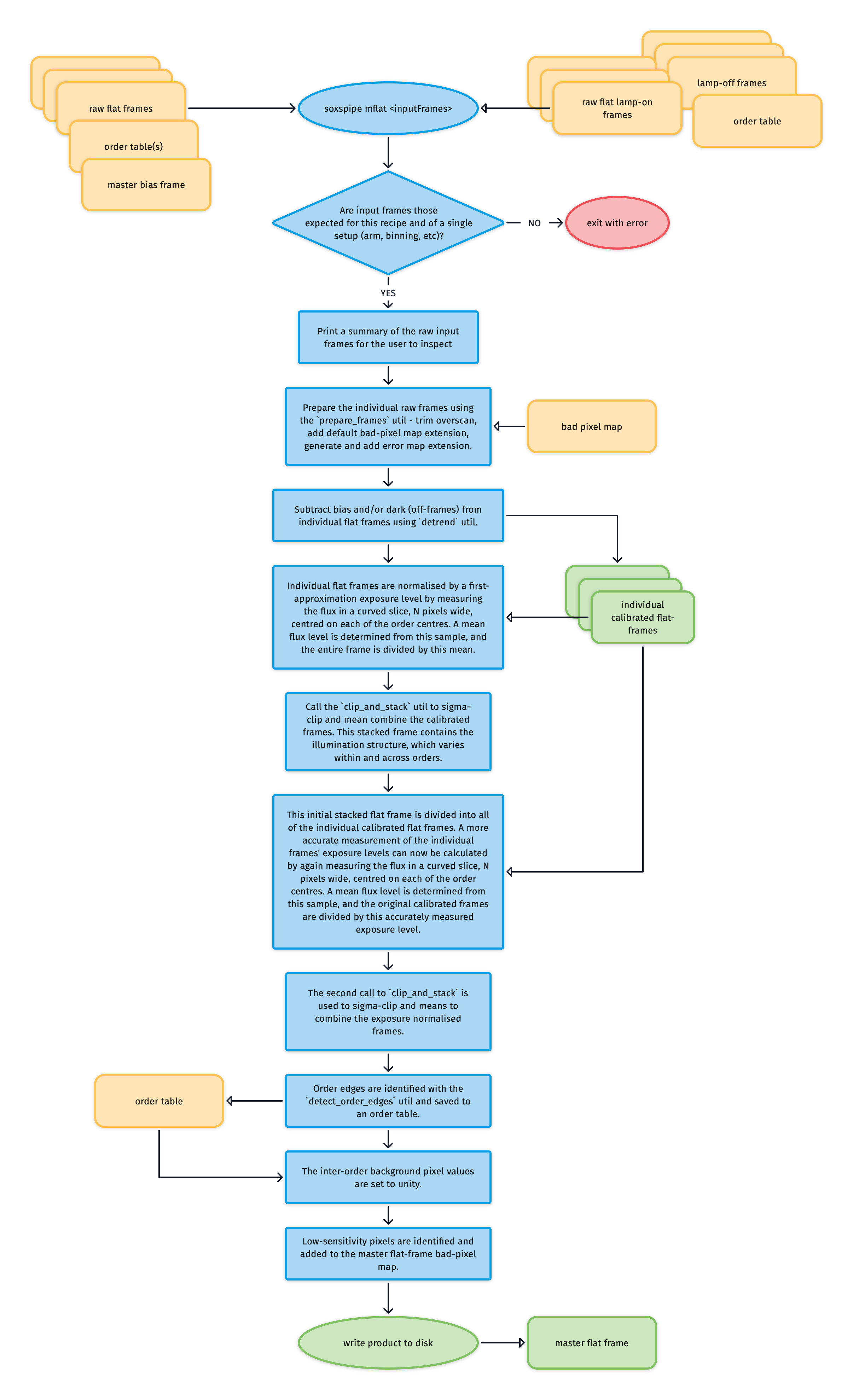
Fig. 37 The soxs_mflat recipe algorithm. At the top of the diagram, NIR input data is found on the right and VIS on the left.
The individual flat field frames have bias and dark signatures removed using the detrend utility. Here is an example of one such calibrated flat frame:
Normalising Exposure Levels in Individual Flat Frames
Once calibrated, exposure levels in the individual flat frames are normalised, as the total illumination varies from frame to frame. The individual frame exposure levels are calculated in two stages.
In the first stage, the mean inner-order pixel value across the frame is used as a first approximation of an individual frame’s exposure level. To calculate this mean value, the order locations identify a curved slice N pixels wide centred on each order centre, and bad pixels are masked (see Fig. 38). The collected inner-order pixel values are then sigma-clipped to exclude outlying values, and a mean value is calculated.
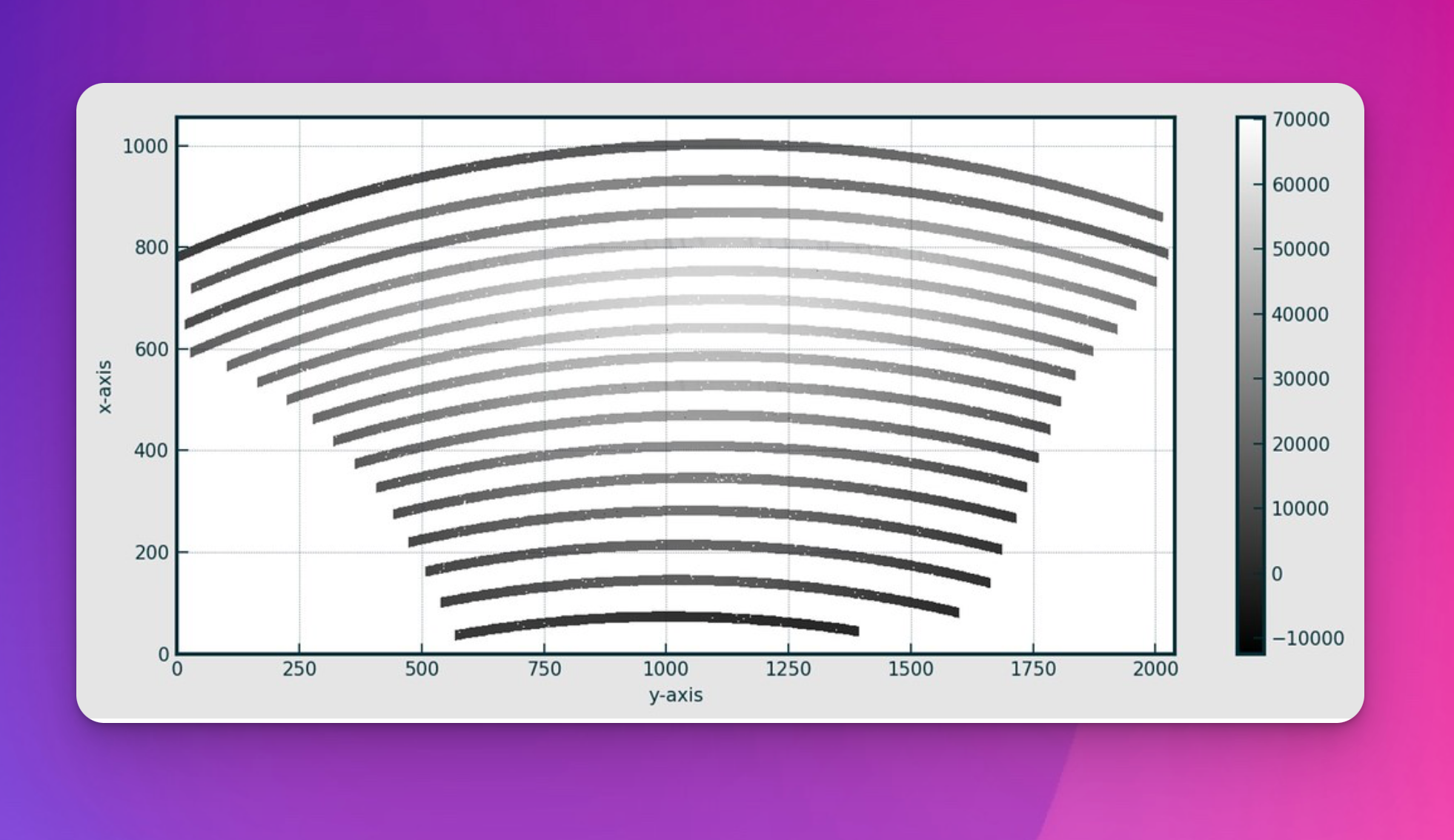
Fig. 38 The inner regions of the echelle orders are used to calculate a mean exposure level for the individual flats.
In a first attempt to normalise the exposure levels of individual frames, they are divided by their mean inner-order pixel value. These normalised flat frames are combined using the clip_and_stack utility to create a first-pass master-flat frame.
The second stage divides each original dark and bias-subtracted flat frame by this first-pass master flat (see Fig. 39). This removes the typical cross-plane illumination. So now, the mean inner-order pixel value across the frame will better estimate each frame’s intrinsic exposure level.
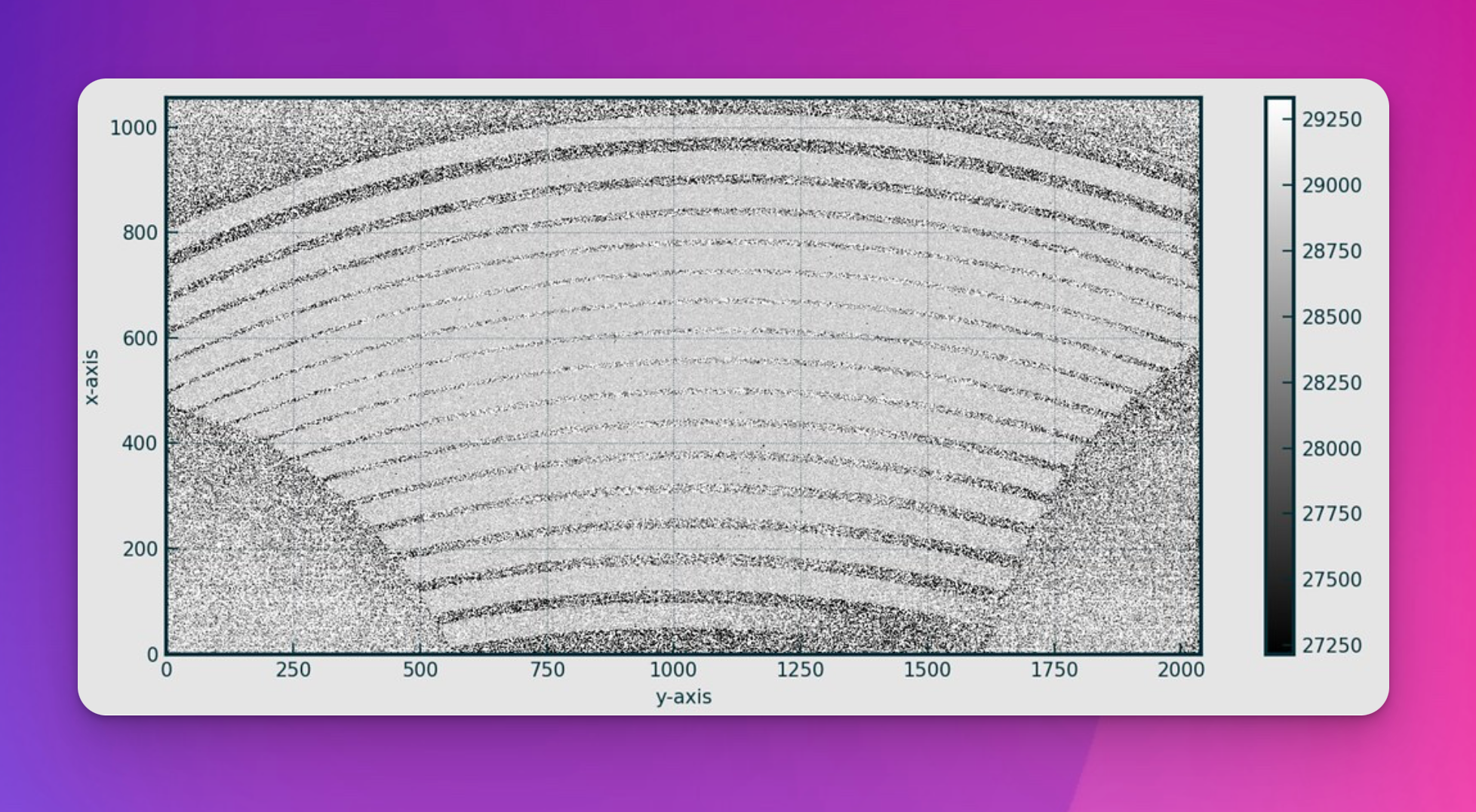
Fig. 39 An individual flat frame divided by the first-pass master flat.
On this frame, the mean inner-order pixel value is calculated again, and the original dark and bias-subtracted flat is re-normalised by being divided by this accurate measurement of its intrinsic exposure level.
Building a Final Master-Flat Frame
These re-normalised flats are then combined for a second time into a master-flat frame.
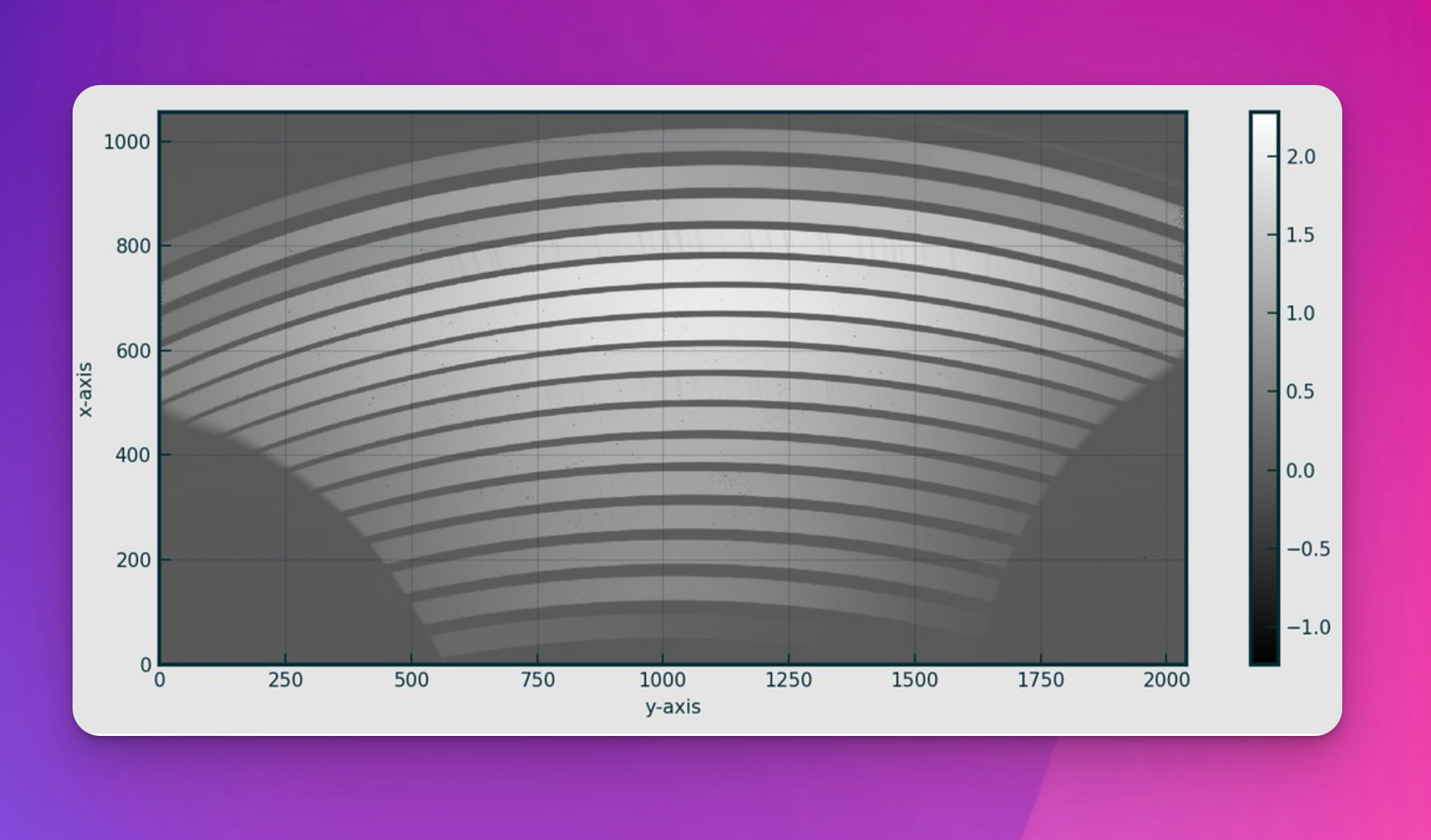
Fig. 40 A master-flat frame for Xshooter NIR.
Finally, order edges are located with the detect_order_edges utility, and the inter-order area pixel value is set to 1.
Low-sensitivity pixels are flagged and added to the bad-pixel map, and the final master-flat frame is written to disk.
UV Master Flat Frame Stitching
As the UV-VIS uses a combination of D-lamp and QTH-lamp flat sets, a further step is required to stitch the best orders from each of these master flats together into a dual-lamp master flat (see Fig. 41).
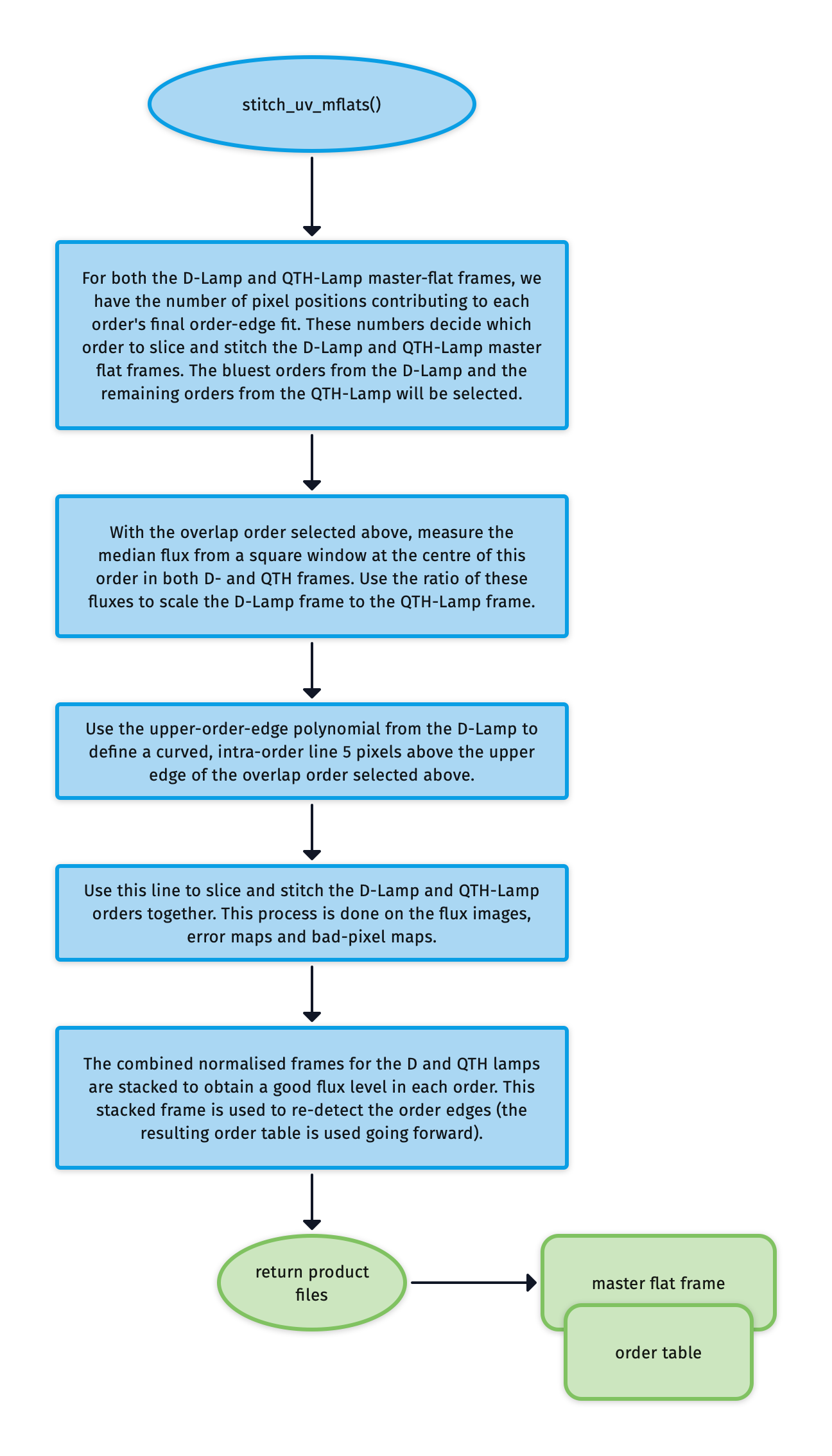
Fig. 41 The algorithm used to stitch together master flat frames from the UVB D- and QTH lamps to form a single flat frame covering the entire UVB wavelength range.
For both the D-Lamp and QTH-Lamp master flat frames, we have the number of pixel positions that contributed to the final order-edge fit for each order. We use these numbers to decide which orders to slice and stitch from the D-Lamp to the QTH-Lamp master flat frame.
With a crossover order now selected, the median flux from a square window at the centre of this order in both D- and QTH frames is measured. Using the ratio of these fluxes, the D-Lamp frame is scaled to the QTH-Lamp frame.
From the upper order-edge polynomial for the D-Lamp, we define a curved, intra-order line 5 pixels above the upper edge of the crossover order selected previously. This line is used to slice and stitch the D-Lamp and QTH-Lamp orders together. This process is done on the flux images, error maps and bad-pixel maps. Typically, the bluest orders from the D-Lamp will be selected, with the remaining orders coming from the QTH-Lamp.
Finally, the combined normalised frames for the D and QTH lamps are stacked to obtain a good flux level in each order. This stacked frame is used to re-detect the order edges (the resulting order table is used going forward).
Output
Label |
Content |
Data Type |
PRO CATG |
PRO TYPE |
PRO TECH |
|---|---|---|---|---|---|
|
table of coefficients from polynomial fits to order locations |
FITS |
|
|
|
|
master spectroscopic flat frame |
FITS |
|
|
|
|
visualisation of goodness of order edge fitting |
- |
- |
- |
|
|
Fitted intra-order image background |
- |
- |
- |
Label |
Content |
Data Type |
PRO CATG |
PRO TYPE |
PRO TECH |
|---|---|---|---|---|---|
|
table of coefficients from polynomial fits to order locations |
FITS |
|
|
|
|
UVB master spectroscopic flat frame (DLAMP) |
FITS |
|
|
|
|
table of coefficients from polynomial fits to order locations |
FITS |
|
|
|
|
UVB master spectroscopic flat frame (QLAMP) |
FITS |
|
|
|
|
table of coefficients from polynomial fits to order locations |
FITS |
|
|
|
|
UVB master spectroscopic flat frame |
FITS |
|
|
|
|
visualisation of goodness of order edge fitting |
- |
- |
- |
|
|
Fitted intra-order image background DLAMP |
- |
- |
- |
|
|
visualisation of goodness of order edge fitting |
- |
- |
- |
|
|
Fitted intra-order image background QLAMP |
- |
- |
- |
|
|
visualisation of goodness of order edge fitting |
- |
- |
- |
QC Metrics
Label |
Description |
Unit |
Acceptable Range |
|---|---|---|---|
|
Fraction of colf pixels |
- |
|
|
Mean inner-order pixel value |
electrons |
VIS: [0.9,1.1], NIR: [0.9,1.1] |
|
Sum of all inner-order pixel values |
electrons |
VIS: [100000,700000], NIR: [1000000,1200000] |
|
Number of cold pixels |
VIS: [0.0,0.01], NIR: [0.0,0.01] |
|
|
Number of low-sensitivity pixels found in master flat |
pixels |
- |
|
10th percentile inter-order flux |
electrons |
- |
|
50th percentile inter-order flux |
electrons |
- |
|
90th percentile inter-order flux |
electrons |
VIS: [10000,150000], NIR: [30000,60000] |
|
Maximum residual in order edge fit along x-axis |
pixels |
- |
|
Minimum residual in order edge fit along x-axis |
pixels |
- |
|
Std-dev of residual order edge fit along x-axis |
pixels |
VIS: [0,0.37], NIR: [0,0.2] |
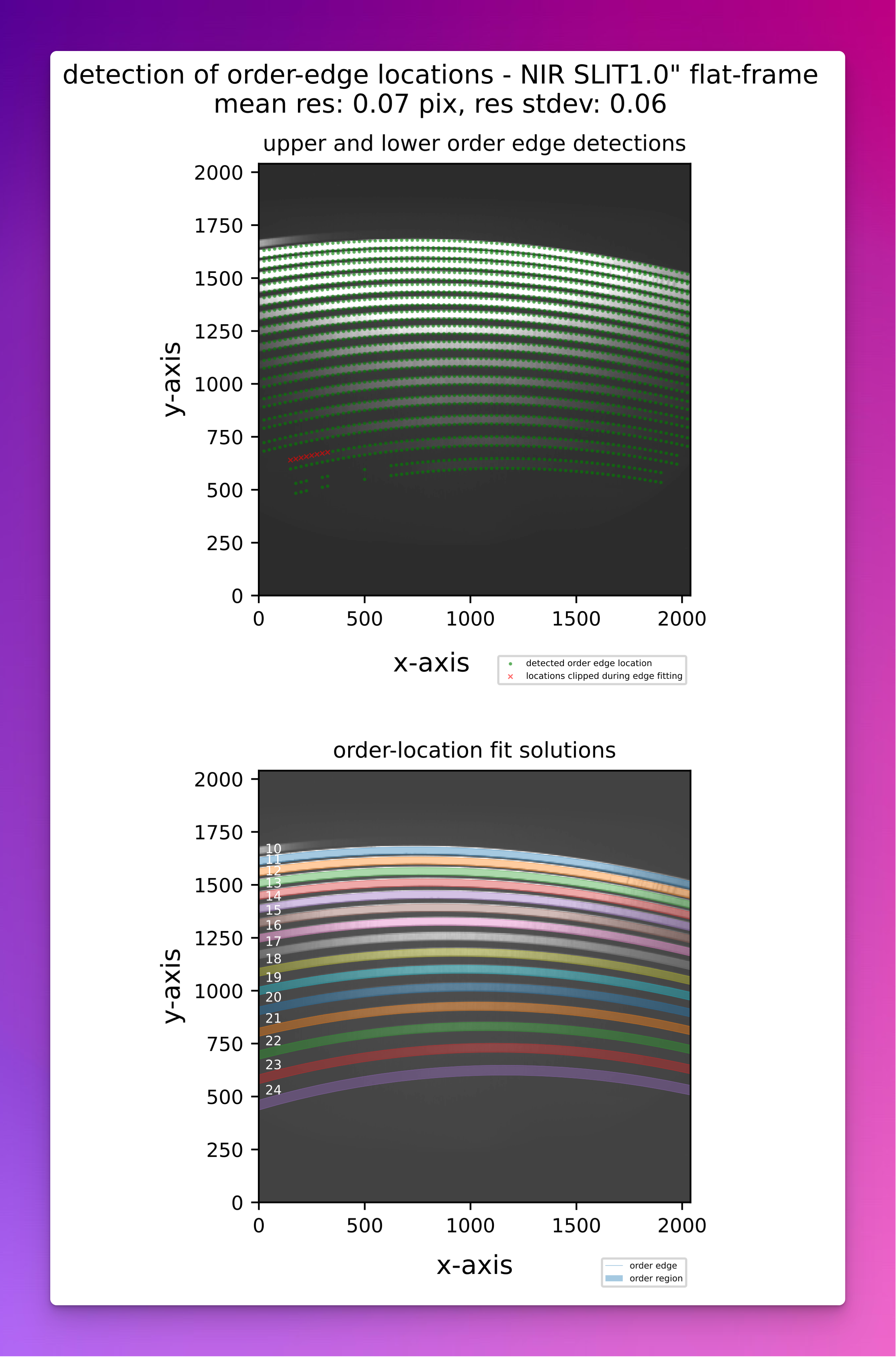
Fig. 42 A QC plot resulting from the soxs_mflat recipe (SOXS NIR). The top panel shows the upper and lower-order edge detections registered in the individual cross-dispersion slices in a SOXS NIR flat frame. The bottom panel shows the global polynomial fits to the upper and lower-order edges, with the area between the fits filled with different colours to reveal the unique echelle orders across the detector plane.
Recipe API
- class soxs_mflat(log, settings=False, inputFrames=[], verbose=False, overwrite=False, command=False, debug=False, turnOffMP=False)[source]
Bases:
soxspipe.recipes.base_recipe.base_recipegenerate a single normalised master flat-field frame
Key Arguments
log– loggersettings– the settings dictionaryinputFrames– input fits frames. Can be a directory, a set-of-files (SOF) file or a list of fits frame paths.verbose– verbose. True or False. Default Falseoverwrite– overwrite the product file if it already exists. Default Falsecommand– the command called to run the recipedebug– generate debug plots. Default FalseturnOffMP– turn off multiprocessing. True or False. Default False. If True, multiprocessing will be turned off and the recipe will run in serial. This is useful for debugging.
Usage
from soxspipe.recipes import soxs_mflat
recipe = soxs_mflat(
    log=log,
    settings=settings,
    inputFrames=fileList
)
mflatFrame = recipe.produce_product()
Initialization
- calibrate_frame_set()[source]
given all of the input data calibrate the frames by subtracting bias and/or dark
Return:
calibratedFlats– the calibrated frames
- find_uvb_overlap_order_and_scale(dcalibratedFlats, qcalibratedFlats)[source]
find uvb order where both lamps produce a similar flux. This is the order at which the 2 lamp flats will be scaled and stitched together
Key Arguments:
qcalibratedFlats– the QTH lamp calibration flats.dcalibratedFlats– D2 lamp calibration flats
Return:
order– the order number where the lamp fluxes are similar
Usage:
overlapOrder = self.find_uvb_overlap_order_and_scale(dcalibratedFlats=dcalibratedFlats, qcalibratedFlats=qcalibratedFlats)
- mask_low_sens_pixels(frame, orderTablePath, returnMedianOrderFlux=False, writeQC=True)[source]
add low-sensitivity pixels to bad-pixel mask
Key Arguments:
frame– the frame to work onorderTablePath– path to the order tablereturnMedianOrderFlux– return a table of the median order fluxes. Default False.writeQC– add the QCs to the QC table?
Return:
frame– with BPM updated with low-sensitivity pixelsmedianOrderFluxDF– data-frame of the median order fluxes (ifreturnMedianOrderFluxis True)
- normalise_flats(inputFlats, orderTablePath, firstPassMasterFlat=False, lamp='')[source]
determine the median exposure for each flat frame and normalise the flux to that level
Key Arguments:
inputFlats– the input flat field framesorderTablePath– path to the order tablefirstPassMasterFlat– the first pass of the master flat. Default Falselamp– a lamp tag for QL plots
Return:
normalisedFrames– the normalised flat-field frames (CCDData array)
- produce_product()[source]
generate the master flat frames updated order location table (with egde detection)
Return:
productPath– the path to the master flat frame
- stitch_uv_mflats(medianOrderFluxDF, orderTablePath)[source]
return a master UV-VIS flat frame after slicing and stitch the UV-VIS D-Lamp and QTH-Lamp flat frames
Key Arguments:
medianOrderFluxDF– data frame containing median order fluxes for D and QTH framesorderTablePath– the original order table paths from order-centre tracing
Return:
stitchedFlat– the stitch D and QTH-Lamp master flat frame
Usage:
mflat = self.stitch_uv_mflats(medianOrderFluxDF)