soxs_mflat
The soxs_mflat recipe creates a single normalised master-flat frame used to correct for non-uniformity in response to light across the detector plane. Hot and dead pixels are also detected and added to a bad-pixel mask. Finally, the echelle order edges are detected and fitted with a polynomial model.
Sources of this non-uniformity include: Varying pixel sensitivities. Obstructions in the optical path (e.g., dust or pollen grains). Vignetting at the edges of the detector. A flat frame is ideally an image taken with uniform illumination across the detector’s light-collecting pixels. This evenly exposed image can be used to identify irregularities in the detector’s response.
Usage
The soxs_mflat recipe can be run with the following convention:
soxspipe [-Vx] mflat <inputFrames> [-o <outputDirectory> -s <pathToSettingsFile>]
To rerun a previously executed soxs_mflat recipe, you can find the execution command at the end of the recipe log file (found in the workspace products/soxs_mflat directory). Use the -x flag to overwrite the product files if they already exist. For example, from the root of your workspace, you would run a command like:
soxspipe mflat sof/20251012T111444_VIS_2X2_3_MFLAT_QTH_SLIT0_5_20_0S_SOXS.sof -s ./sessions/base/soxspipe.yaml -x
To adjust the default settings for the soxs_mflat recipe, open the soxspipe.yaml file referenced in the command above in a text editor, navigate to the soxs_mflat dictionary, save the file and rerun the recipe command. The settings’ descriptions can be found in Table 17.
Product files are written in the products/soxs_mflat, and QC plots are in the qc/soxs_mflat workspace directory. A report of the product files, QC plots and metrics is also printed to the terminal. The QC metrics calculated for soxs_mflat are found in soxs_mflat_qc and a typical QC plot in soxs_mflat_qc_fig.
Reduction Tips
If this recipe fails during the fitting of the order edge, the first parameter to adjust is poly-fitting-residual-clipping-sigma. Try reducing this to 3-5 sigma and rerun the recipe to see if a fit is found. If the fit still fails, next try and increase the slice-width-for-edge-detection to 5-9 pixels to give the code a better chance of detecting the order-edges.
If the previous adjustments have not helped, you can slowly reduce min-percentage-threshold-for-edge-detection and/or increase max-percentage-threshold-for-edge-detection by 2-3 percent and attempt a refit.
You can also try adjusting the polynomial fitting orders in order-deg and disp-axis-deg. However, please be advised the pipeline itself will dynamically adjust these values if they fail to fit the default set. It will slowly reduce the orders and refit until it finds a fit or decides a fit can not be found (after five iterations of decreasing the orders).
Parameters
Parameter |
Description |
Type |
Entry Point |
Related Util |
|---|---|---|---|---|
|
fit and subtract the intra-order background light |
bool |
settings file |
|
|
the sigma clipping limit used when stacking frames into a composite frame |
float |
settings file |
|
|
the maximum sigma-clipping iterations used when stacking frames into a composite frame |
int |
settings file |
|
|
size of the window (in pixels) used to measure flux in the central band to determine median exposure |
int |
settings file |
- |
|
length of the cross_dispersion slices used to determine order edges |
int |
settings file |
|
|
width of the cross_dispersion slices used to determine order edges |
int |
settings file |
|
|
minimum value flux can drop to as percentage of central flux and be counted as an order edge |
int |
settings file |
|
|
maximum value flux can climb to as percentage of central flux and be counted as an order edge |
int |
settings file |
|
|
degree of y-component of global polynomial fit to order edges |
int |
settings file or command-line |
|
|
degree of echelle order number component of global polynomial fit to order edges |
int |
settings file or command-line |
|
|
sigma clipping limit when fitting global polynomial to order edges |
float |
settings file |
|
|
maximum number of clipping iterations when fitting global polynomial to order edges |
int |
settings file |
|
|
pixels with a flux less than this many sigma (mad) below the median flux level added to the bp map |
float |
settings file |
- |
|
scale d2 to qth lamp flats when stitching |
bool |
settings file |
- |
|
degree of bsplines used to fit the inter-order background (if |
int |
settings file |
|
|
Standard deviation of Gaussian kernel used to smooth background image (if |
int |
settings file |
Input
Data Type |
Content |
Related OB |
Min. Frame Count |
|---|---|---|---|
FITS image |
Raw flats frames (exposures with identical exposure time, slit-width and detectors readout parameters). |
|
5 |
FITS Image |
A master bias Frame (UV-VIS only) |
- |
- |
FITS Image |
A master dark frame or lamp-off frames with identical exposure times to the lamp-on flat frames (NIR only) |
- |
- |
FITS Table |
An order location table containing coefficients to the polynomial fit describing the order centre locations. |
- |
- |
Output
Label |
Content |
Data Type |
PRO CATG |
PRO TYPE |
PRO TECH |
|---|---|---|---|---|---|
|
table of coefficients from polynomial fits to order locations |
FITS |
|
|
|
|
master spectroscopic flat frame |
FITS |
|
|
|
|
visualisation of goodness of order edge fitting |
- |
- |
- |
|
|
Fitted intra-order image background |
- |
- |
- |
Label |
Content |
Data Type |
PRO CATG |
PRO TYPE |
PRO TECH |
|---|---|---|---|---|---|
|
table of coefficients from polynomial fits to order locations |
FITS |
|
|
|
|
UVB master spectroscopic flat frame (DLAMP) |
FITS |
|
|
|
|
table of coefficients from polynomial fits to order locations |
FITS |
|
|
|
|
UVB master spectroscopic flat frame (QLAMP) |
FITS |
|
|
|
|
table of coefficients from polynomial fits to order locations |
FITS |
|
|
|
|
UVB master spectroscopic flat frame |
FITS |
|
|
|
|
visualisation of goodness of order edge fitting |
- |
- |
- |
|
|
Fitted intra-order image background DLAMP |
- |
- |
- |
|
|
visualisation of goodness of order edge fitting |
- |
- |
- |
|
|
Fitted intra-order image background QLAMP |
- |
- |
- |
|
|
visualisation of goodness of order edge fitting |
- |
- |
- |
QC Metrics
Label |
Description |
Unit |
Acceptable Range |
|---|---|---|---|
|
Fraction of colf pixels |
- |
|
|
Mean inner-order pixel value |
electrons |
VIS: [0.9,1.1], NIR: [0.9,1.1] |
|
Sum of all inner-order pixel values |
electrons |
VIS: [100000,700000], NIR: [1000000,1200000] |
|
Number of cold pixels |
VIS: [0.0,0.01], NIR: [0.0,0.01] |
|
|
Number of low-sensitivity pixels found in master flat |
pixels |
- |
|
10th percentile inter-order flux |
electrons |
- |
|
50th percentile inter-order flux |
electrons |
- |
|
90th percentile inter-order flux |
electrons |
VIS: [10000,150000], NIR: [30000,60000] |
|
Maximum residual in order edge fit along x-axis |
pixels |
- |
|
Minimum residual in order edge fit along x-axis |
pixels |
- |
|
Std-dev of residual order edge fit along x-axis |
pixels |
VIS: [0,0.37], NIR: [0,0.2] |
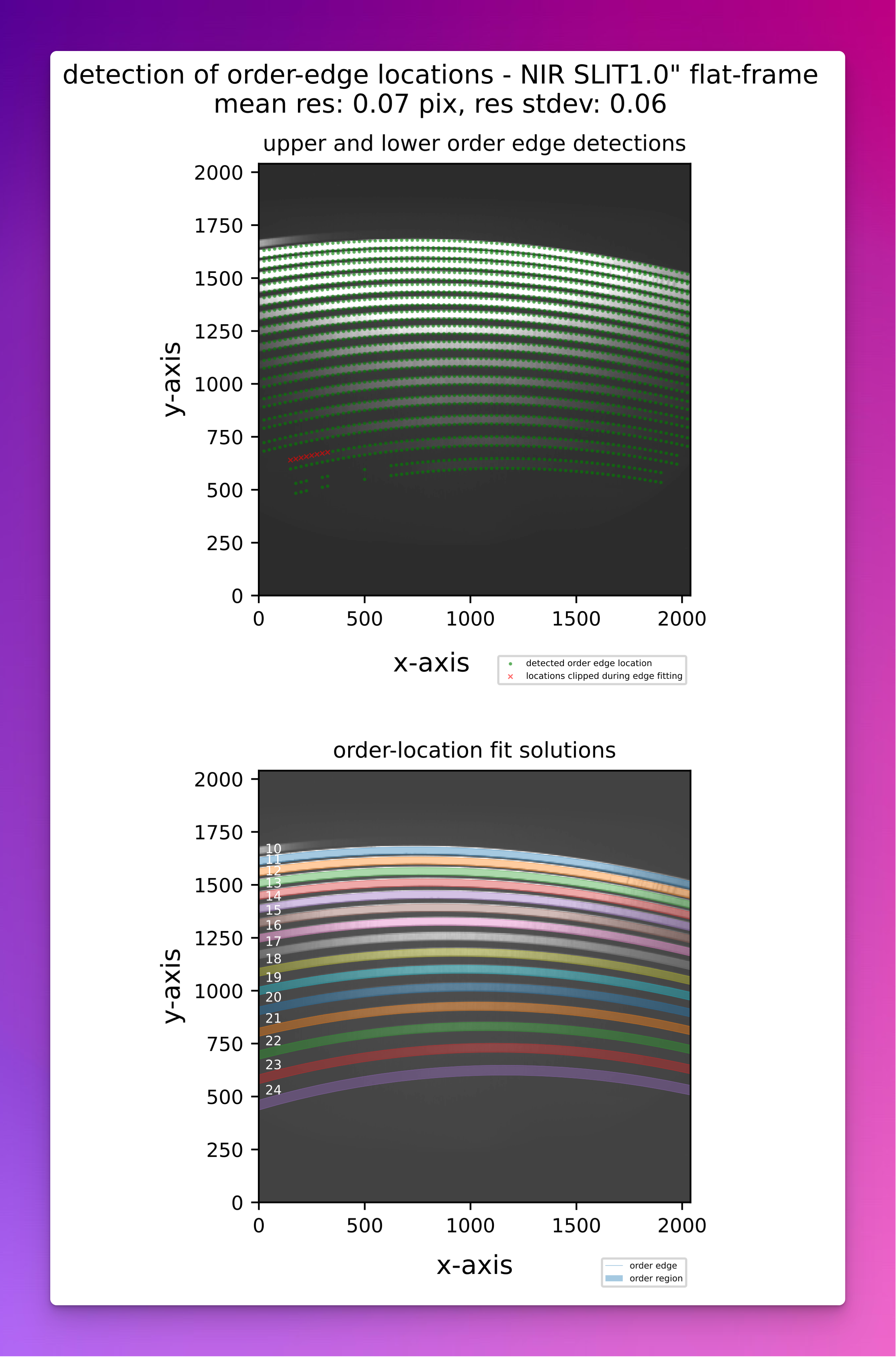
Fig. 15 A QC plot resulting from the soxs_mflat recipe (SOXS NIR). The top panel shows the upper and lower-order edge detections registered in the individual cross-dispersion slices in a SOXS NIR flat frame. The bottom panel shows the global polynomial fits to the upper and lower-order edges, with the area between the fits filled with different colours to reveal the unique echelle orders across the detector plane.